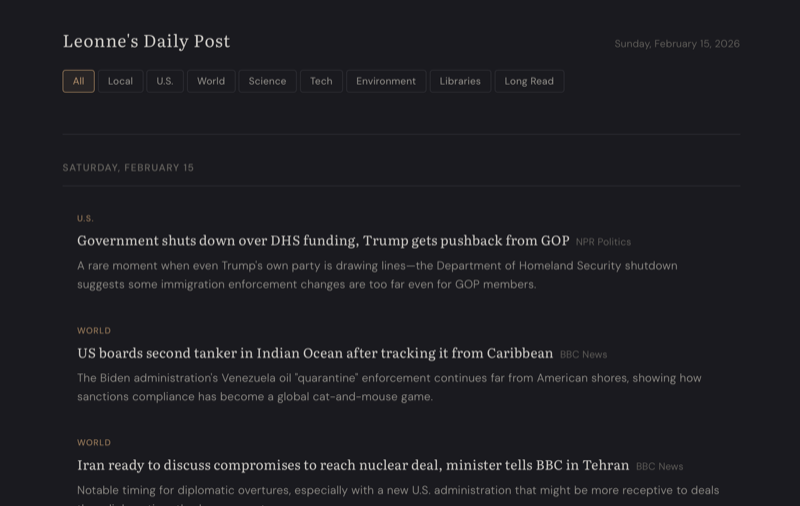
After experimenting with using AI for this blog, I wanted to try something beefier
Yesterday, I posted some of my broader thoughts on AI and briefly discussed how I used Anthropic's Claude to redesign and deploy this site. Given that my goal was to produce an easy-to-administer static site using (mostly) tools and concepts I'm familiar with, I don't think it was a bridge too far. Chatting with my wife, Leonne, I learned that she's been rather frustrated with a lot of news sites and aggregators. They are either too full of editorial, too distracting, or hard to curate. Additionally, she suffers from both ADHD and chronic migraines, so many web sites can be problematic in their design. After my positive experience using Claude for this site, I decided to ask it a new one:
Before we begin this project, I'd like to ask: is there any research or discussion on how best to build a news site or blog that's ADHD-friendly?
That was it. No lengthy ideas just yet. The response was immediate and thorough, followed up with the ask, "Would you like me to use these principles as a design foundation for your project?" We discussed a few other details, like using dark colors to help with migraines (no surprise - web design for ADHD and light-sensitive folks is very similar), some branding, and how we expect the content to be presented. As we workshopped the design, one of my ideas was to start with a small excerpt that could be opened into a more detailed one before moving onto the site. Claude handled all design suggestions with ease, even injecting an un-asked for keyboard shortcut option to make the site even easier to use. We also discussed ways to include helpful information, such as reminders about the keyboard shortcuts and how to enable dark/reader modes. Finally, we added some category tagging and sorting options to make it easier to get right to certain subjects.
All of this took about an hour and a half.
Next came the discussion on how the generation and backend would be managed. To give you an idea of how I started down that rabbit hole, I asked this:
Alright... now let's talk about the plan for generation. What I'm thinking is writing a macOS/iOS Shortcut that can call you up and have you pull articles and generate the site at a regular time every morning. By using this method, I can also have Leonne use the shortcut to re-generate the site if she wants more or updates. What are your thoughts on that? Do you have any suggestions on how we could do this workflow better?
After going back and forth on a few details, Claude came up with a fairly elegant solution:
- Use the macOS/iOS Shortcut to send a POST request with a token
- This request gets intercepted by a system service running a program called Flask, which uses it to write the HTML and initiate the rest of the generation
- The server then scrapes a list of pre-configured RSS feeds with a maximum number of results and builds them into a JSON file
- The Claude API gets called up with a pre-built prompt for it to analyze the JSON and work as an editorial layer, further curating those scraped stories based on Leonne's preferences and writing a brief summary for each
- Publish the single static HTML file to the server while maintaining an archive of up to 30 previous files
It took some work, especially with some of the specific ways that I have already been configuring my web servers, but by pasting the results of what the scripts were generating and some of the log files, Claude did a great job helping me troubleshoot. While most of the issues were my own errors, it was always interesting when something would mess up because of a mistake on its end!
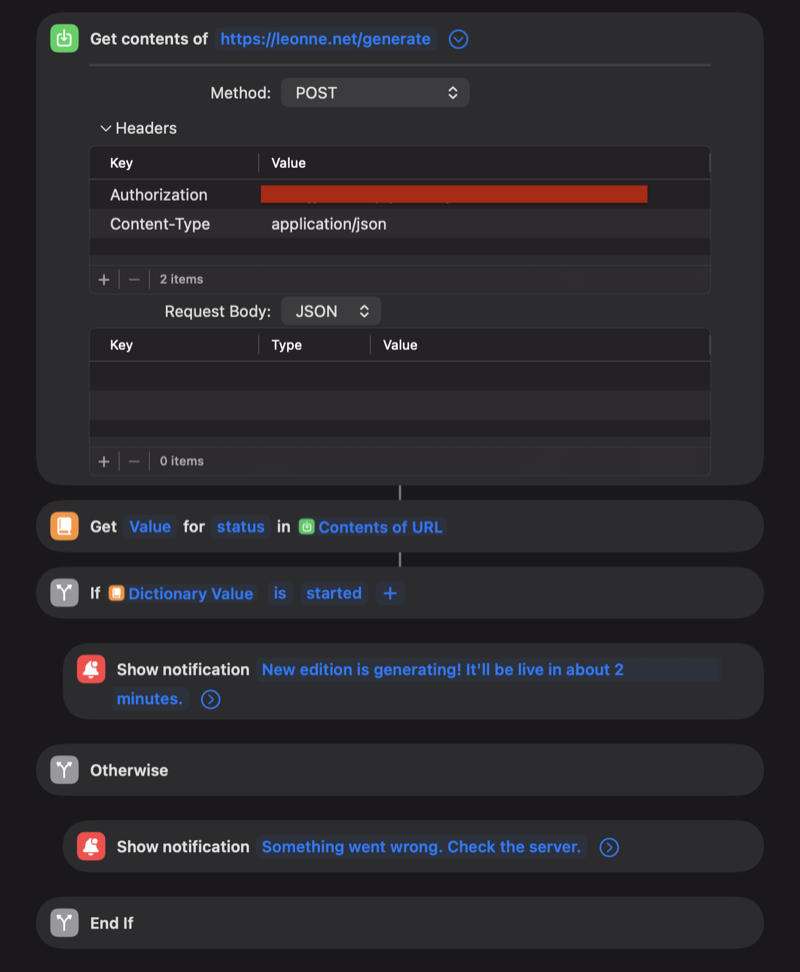
The final step was building the macOS/iOS Shortcut. I've enjoyed the building-blocks approach of Apple's dedicated scripting app, along with the level of access it has to the graphical interface and various applications. By having a Shortcut, I can easily share it to Leonne's iPhone and Mac, give her the ability to launch it using Siri, and even schedule its execution.
Lessons learned
Overall, this was a cool project and I'm happy with how this first draft came out. All told, the project was completed in approximately six hours. One useful thing to note: Using the API is a different pool of money beyond the regular monthly subscription. Claude was able to produce a pretty good idea of how much the API would cost; essentially it's about 30 cents per call. Not enough to break the bank, but I can see this service effectively costing $8-12 per month. Not free, by any stretch, and why I have deliberately chosen not to let it update itself automatically - yet. This uses the last-gen Sonnet 4.5 model and could be switched to the Haiku 4.5 for about a third of the cost, though it might not produce the same high level of results. The good news is that if I'm happy with Sonnet 4.5's work, it will get cheaper over time.
If you're curious, head on over to Leonne.net and check out the result! Before you ask, no, I'm not letting you update it.